Application 01 · Nutrition Intelligence

Aevia Revive.

A precision nutrition companion that maps everything you eat to its complete molecular profile. Meals, smoothies, and packaged foods are logged with intent and analyzed in full depth, with all data stored entirely on your device.

Plate Builder Food Label Entry Smoothie Builder Phyto Spectrum FDA Daily Values Fasting Timer Household Profiles On-Device Data
01 · Dashboard

Your full intake picture, every time you open the app.

The Dashboard is where Aevia Revive begins. Opening the app surfaces your current day in a single view: total calories consumed, dietary fiber, hydration, sugars, and the number of logged entries, all updated the moment you record a new meal or smoothie. A live fasting counter tracks the elapsed time since your last logged intake. Below the summary, a full month grid displays your logging history as a navigable calendar. Tap any date to open that day's complete nutrient breakdown, including every food logged, the macronutrient split, and the full micronutrient readout. A quick-access button pair at the bottom launches a new meal record or the Smoothie Builder without navigating away from home.

  • Daily summary of calories, fiber, hydration, sugars, and meal count, updated in real time.
  • Live fasting counter tied to your most recent logged intake.
  • Month calendar grid with entry indicators — tap any date to review its complete nutrient profile.
  • Direct access to meal recording and the Smoothie Builder from the home screen.
02 · Meal Records

Three ways to record what you actually ate.

Aevia Revive offers three distinct recording modes designed to fit every real-world eating scenario. Plate mode presents a visual ingredient catalog organized into Bases and Grains, Vegetables, Fruits, Proteins, Plant-Based and Phyto-Proteins, Fats and Toppings, and Drinks. Select each component and enter the gram weight for your portion; nutrient estimates are generated immediately from the curated reference database. Food Label mode accepts the numbers directly from any packaged product's nutrition facts panel. Enter the printed label serving and your actual portion in grams or millilitres, and every field — calories, fat, saturated fat, carbohydrates, fibre, sugars, protein, cholesterol, and the full mineral and vitamin list — is scaled precisely to what you consumed. This makes it the right tool for nutrition bars, fortified foods, and anything with a printed label. Photo mode logs a timestamped snapshot to your calendar for quick visual reference; these entries appear on the calendar but do not contribute to nutrient or phyto totals. Saved and recent meals surface at the top of every session for fast relogging.

  • Plate mode: select whole ingredients by gram weight from a categorized visual library with immediate nutrient output.
  • Food Label mode: enter the nutrition facts panel of any packaged food or nutrition bar, scaled precisely to your actual portion.
  • Photo mode: a timestamped snapshot that logs to your calendar without affecting nutrient totals.
  • Saved and recent meals surface at the top of every session.
03 · Smoothie Builder

Pick fresh ingredients. We compute the cellular profile.

The Smoothie Builder is a dedicated environment inside Aevia Revive built specifically for whole, fresh ingredients. A searchable library spans hundreds of fruits, vegetables, seeds, and functional foods, each photographed and tagged with its complete phyto-class composition. Two layered filter systems let you navigate with genuine intention. The first layer uses health-context filters: Antioxidant Boost, Skin Support, Cellular Defense, Oxalate, Phytic Acid, Dietary Nitrates, and Goitrogens. These surface or suppress ingredients based on the considerations most relevant to your goals. The second layer is the phyto-class color sidebar, which groups every ingredient by its dominant polyphenol family across thirteen categories: Anthocyanins, Lycopene, Carotenoids, Quercetin and Flavonols, Glucosinolates, Chlorophyll and Polyphenols, Organosulfur Compounds, Curcuminoids, Omega-3 and Lignans, Ellagitannins, Catechins and Flavanols, Beta-Glucans, and Probiotic Cultures. Select your ingredients, set your portions, and the app computes the complete molecular profile of everything in the glass.

  • Searchable library of hundreds of fresh ingredients, each with a complete phyto-class profile attached.
  • Health-context filters: Antioxidant Boost, Skin Support, Cellular Defense, Oxalate, Phytic Acid, Dietary Nitrates, and Goitrogens.
  • Color-coded phyto-class sidebar spanning thirteen distinct polyphenol families for intentional ingredient selection.
  • Complete molecular profile computed the moment you assemble a blend.
04 · Nutrient Intelligence

Macros, micros, and the full phyto spectrum.

After logging, Aevia Revive generates a comprehensive nutrient portrait for any time window you choose — Today, Week, Month, Year, or a custom range. The macronutrient view presents caloric intake as a percentage of energy from protein, fat, carbohydrates, and fiber. Every tracked micronutrient is then listed alongside its measured quantity and its percentage of the FDA Daily Value: sodium, potassium, magnesium, calcium, iron, zinc, Vitamin C, Vitamin A, Vitamin K, folate, and more. Nutrient Priorities are filtered by sex and organized into four tiers — Critical Priorities, Secondary Health and Metabolic Support, General Wellness and Cardiovascular Balancing, and Items to Monitor and Limit — giving you a structured view of where your current intake stands relative to established reference targets. The Phyto Spectrum maps your eating pattern across five color families: Red for lycopene and ellagitannins, Orange and Yellow for carotenoids and flavonols, Green for glucosinolates and chlorophyll, Blue and Purple for anthocyanins, and White and Tan for organosulfurs, catechins, beta-glucans, and minerals. Coverage of all five families in a single window is tracked as a polyphenol diversity benchmark.

  • Macronutrient split as a percentage of energy across any selected time window.
  • Complete micronutrient readout with FDA Daily Value percentages for every tracked mineral and vitamin.
  • Nutrient Priorities by sex, organized into four tiers from critical deficits to items worth monitoring.
  • Phyto Spectrum analysis across five polyphenol color families with a full-coverage diversity benchmark.

Nutrient Intelligence
05 · Patterns & Export

What your data reveals across any time window.

The Patterns view computes plain-language observations from your recorded intake for any selected period. It surfaces facts like the proportion of your total Vitamin C intake concentrated in a single ingredient, the ratio of potassium to sodium in the window, how many of the five phyto-class color families appeared in your diet, and where each micronutrient sits relative to its FDA Daily Value. An Energy vs Quality chart overlays raw caloric intake against a nutrient-density score per calorie, making visible whether rising energy reflects whole-food nutrition or increased volume without proportionate micronutrient gains. The Intake Map visualizes everything you ate as a proportional treemap — tile size represents gram weight, and color follows your active phyto class or food category filter. Every observation is presented alongside its source reference, whether USDA, FDA, NIH ODS, or published scientific literature. When you are ready to share findings with a registered dietitian or physician, the Export function generates a structured PDF containing full macro and micro totals with FDA Daily Value percentages, the phyto-color spectrum breakdown, your most-consumed foods, and a 14-day daily intake summary.

  • Source-referenced pattern observations across Today, Week, Month, Year, or any custom range.
  • Energy vs Quality chart: raw caloric intake plotted against nutrient density per calorie over time.
  • Intake Map treemap: your diet visualized by gram weight, color-coded by phyto class or food category.
  • PDF export with macro and micro totals, phyto spectrum, top foods, and a 14-day breakdown, ready for a clinical or dietary conversation.
Patterns & Export
06 · Aevia Chronos & Aevia Circadia

Fasting windows and sleep reminders, built directly in.

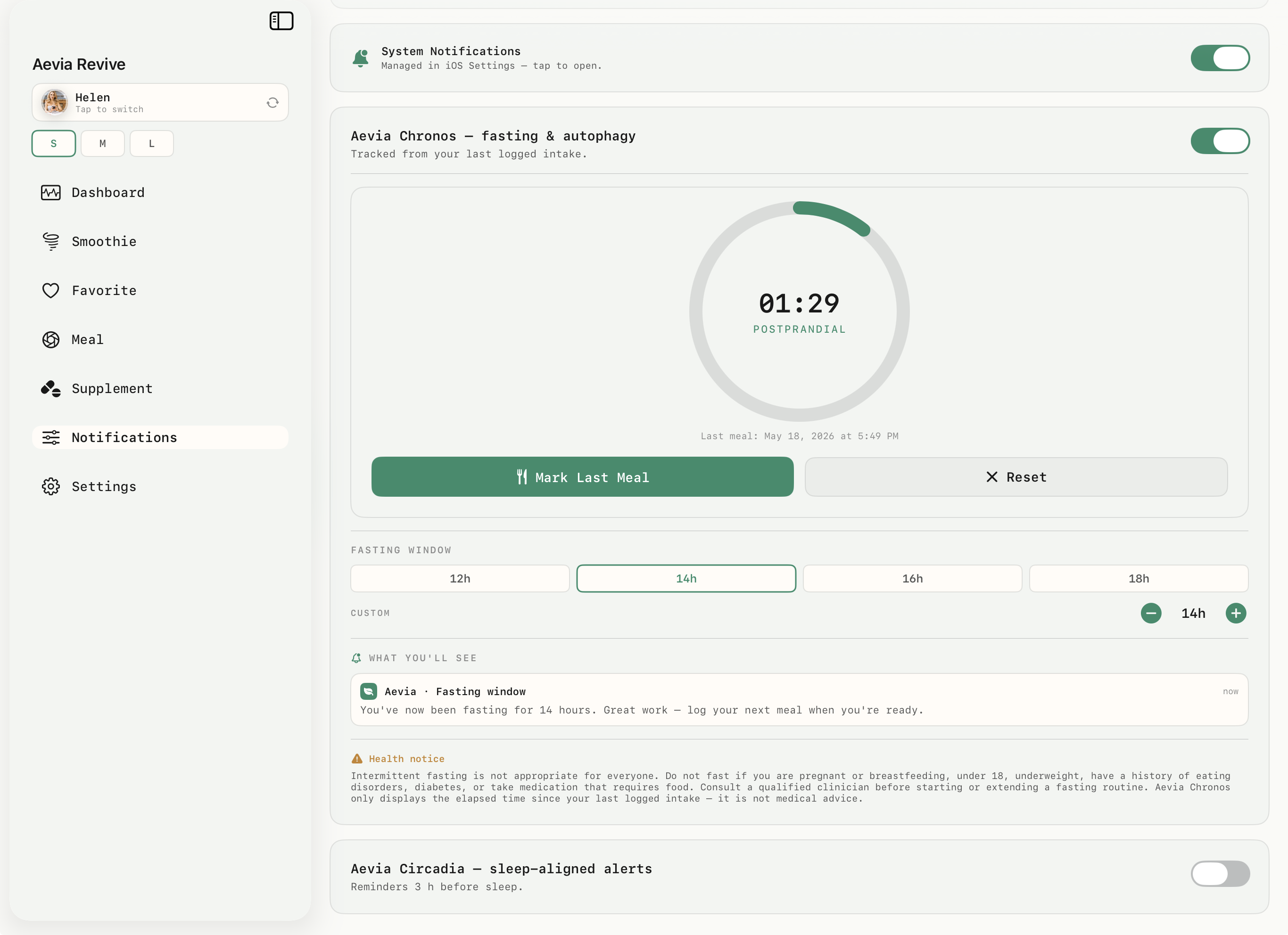
Two notification systems are integrated into Aevia Revive under the Notifications tab. Aevia Chronos is a fasting timer that begins counting from your last logged meal. Set a target window — 12, 14, 16, or 18 hours, or a fully custom duration — and Aevia Chronos sends a notification when the target is reached. A single tap marks your last meal or resets the timer at any point. The app includes a visible health notice within this feature: intermittent fasting is not appropriate for everyone, and the timer reflects only the elapsed time since your last logged intake, not a medical assessment of any kind. Aevia Circadia is a sleep-aligned alert that sends a configurable reminder three hours before your set bedtime, giving you a consistent cue to close your eating window in time for an uninterrupted overnight fast.

  • Aevia Chronos: fasting timer counting from your last logged intake, with preset windows of 12, 14, 16, or 18 hours plus a fully adjustable custom duration.
  • Single-tap controls to mark your last meal or reset the timer at any point.
  • Aevia Circadia: a configurable reminder sent three hours before your intended bedtime.
  • An in-app health notice clearly states that the timer reflects logged intake data only and is not medical guidance.
Aevia Chronos & Circadia
07 · Household Profiles

Track nutrition for everyone in your life.

The primary account holder can add individual profiles for any member of the household. Children, parents, a partner, or even a pet — any subject whose nutrition matters to you can have their own dedicated profile with a completely isolated logging history, nutrient timeline, Phyto Spectrum, and Patterns view. Switching between profiles takes a single tap from the sidebar. No records are shared or averaged across profiles. Every profile gains access to the same full suite of analysis tools available to the primary account, including Dashboard, Nutrients, Patterns, and PDF export.

Individual Data Environments
Each profile carries its own completely isolated logs, nutrient history, phyto analysis, and pattern findings. Nothing is shared or merged across profiles.
Flexible Household Roster
Add profiles for children, parents, a partner, or a pet. Any member of the household whose nutrition you want to track can be added as a dedicated profile.
Single-Tap Profile Switching
The active profile is always visible in the sidebar. Switch instantly at the start of any logging session without navigating away from your current screen.
Full Analysis Per Profile
Dashboard, Patterns, Nutrients, Phyto Spectrum, and PDF export are available for every profile you create, not only the primary account.